Audimation Services has been acquired by Caseware International Learn More.

X
Icon


Blog Image

Tech Tip: Report Reader Menu (Customize)


I had much sympathy for a recent caller to our help desk complaining about the size of the icons on the Report Reader ribbon. I make it a habit of using my 24” monitor but working remote – on a standard laptop screen…way too small for my older eyes.

Report Reader Menu Icons

RIGHT-CLICK anywhere on the ribbon to bring up the hidden customization dialog.

Report Reader Customize Option

Three tabs are displayed, under OPTIONS – select LARGE ICONS and close.
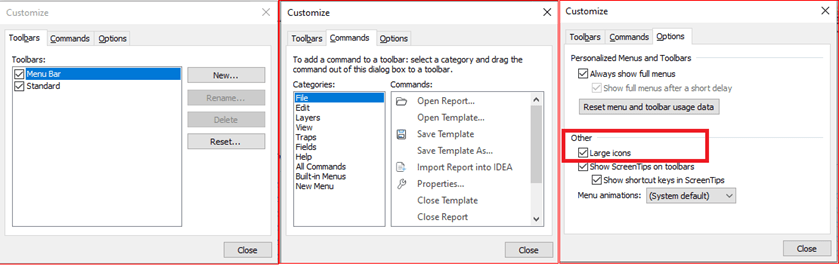
Report Reader Customize Options Dialog

Sadly, it appears that you must re-set to LARGE ICONS every time you use the Report Reader. We have been informed by CaseWare that the larger icons will be the default in the next release of IDEA later this year.

Report Reader with Large Menu Icons


CaseWare IDEA , Importing , Tech Tip


Posted By

By Kris Willison
Kris joined the Professional Services team in January of 2015 as a Solutions Specialist. She has an extensive background in Software and Database Development accumulated from thirty years in IT support with twenty years’ experience in database development, cleanup, audit and migration using Microsoft Access. In her time with Audimation, she has received client praise for her “Top Tier” engagement on Monitor and Scripting projects. Kris enjoys looking at problems from new angles to determine the most efficient means of meeting the clients’ needs. Kris has been breeding/showing purebred Balinese cats since 1972 and Oriental Longhairs since 1996. She also hosts one of the largest online pedigree database sites for Siamese and related breeds with nearly 600 users worldwide.


Related Posts
Tech Tip: Identifying Duplicates and Removing Reversals – Revisited
Jun 16 In the Aug-2019 newsletter we reviewed this process using IDEA v9 or v10. IDEA 11.2 released 13-Oct-2020 updates the analytic, Duplicate Key Exclusion: You c...
Tech Tip: Magic of Field Statistics
Aug 03 IDEA’s Field Statistics can save you a wealth of time. It should be the first thing you go to after importing a file. Why? Every control total is avail...
Tech Tip: IDEA 11 Labs: CURRENCY CONVERTER
Nov 24 If you find yourself confronted with a file containing transaction records with different currencies, don’t panic! IDEA has a feature that automatically track...
BROWSER NOT SUPPORTED

This website has been designed for modern browsers. Please update. Update my browser now

×