X

Audimation Services has been acquired by Caseware International Learn More.

There are times when you import a date field and it just does not work out as expected. Here are ways to address the problem before or after the import.
REPORT READER import requires a MASK when you classify a field as a date. If the data shifts slightly, you need to configure the field as character in order to import. If the date is formatted as MM/DD/YYYY (2-digit month and day) it is easy enough once imported to MODIFY FIELD converting it from character to date by supplying the correct “mask”.
However – there are times that it varies, mixed 1 and 2 digits for month and day.
Check out the CaseWare Passport for Custom Functions for IDEA.
Convert Date – DMYYYY to IDEA Date Format
Converts a string in D/M/YYYY or D-M-YYYY format to the IDEA date format (YYYYMMDD).
D can be one or two digits (1 or 01). M can be one, two or three characters or digits (01, 1, Jul). Any date prior to 19000101 is invalid.
Download the custom function file: DMYYYYToIdea.ideafunc and save to the CUSTOM FUNCTIONS.ILB folder of your current project. Equation to APPEND a new DATE field would be:
#DMYYYYToIdea(CHAR_DATE_FIELD)
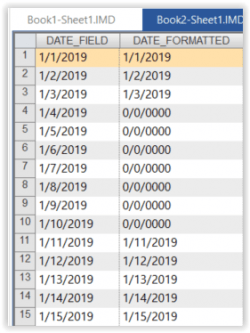
EXCEL imports can cause a different problem. IDEA scans the data in each column for a fixed number of records to determine the data type. If you forget to check FIRST ROW IS FIELD NAMES, all columns are imported as CHARACTER. If you fail to check IMPORT EMPTY NUMERIC CELLS AS 0, columns with blank rows are imported as CHARACTER. In addition, for some reason, the mask for the imported dates is DD/MM/YYYY if you choose to MODIFY FIELD to convert from character to date by supplying the correct “mask.”

Want to avoid the need to append or modify a field? Simply check both options prior to import. Both options are automatically checked starting with IDEA 10.4.

Both columns imported as date fields!
If you have questions about this or other IDEA functions, please give our help desk a call at:
888-641-2800 Option 4
Or email us at [email protected]


This website has been designed for modern browsers. Please update. Update my browser now